AI Visibility Assessment
NeuralAdX Ltd
Find out if AI is mentioning, citing or ignoring your business
Get a clean starting point before spending money on AI visibility work. NeuralAdX Ltd checks your website against an 11-factor GEO framework and tests five live commercial AI prompts to see whether AI engines mention, cite, recommend or ignore your business.
11-factor GEO review
No obligation
GEO framework factors checked
commercial AI prompts tested live
Recommended first step
Send your request in under two minutes
The email button opens a pre-filled message. Add your website URL, best contact number, five priority AI prompts and any helpful context.
Prefer to talk? Call NeuralAdX Ltd
No obligation. Suitable for businesses considering professional Generative Engine Optimisation service support. You can also review the AI Citation Benchmark, AI Answer Visibility & Share of Voice Benchmark and live AI retrieval proof.
NeuralAdX Ltd Editorial Guide · Technical SEO and Generative Engine Optimisation. Updated 13 June 2026
Evidence-led technical visibility analysis
NeuralAdX Ltd — Boost Your Website Loading Speed or Lose AI Search Visibility
A slow website is not automatically excluded from AI answers. That would be an exaggerated claim. The defensible reality is more serious: loading speed, responsiveness and visual stability support the same crawlable, indexed, usable and commercially effective web experience that Google now says underpins its generative AI features in Search.
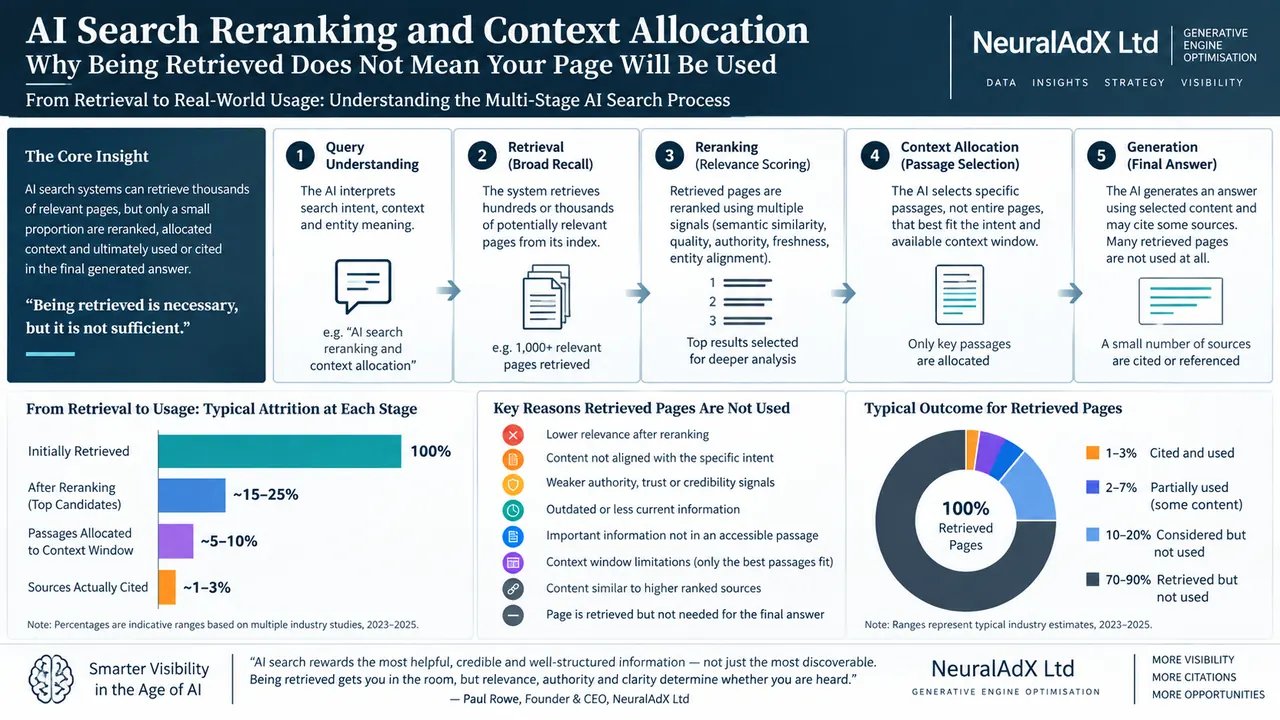
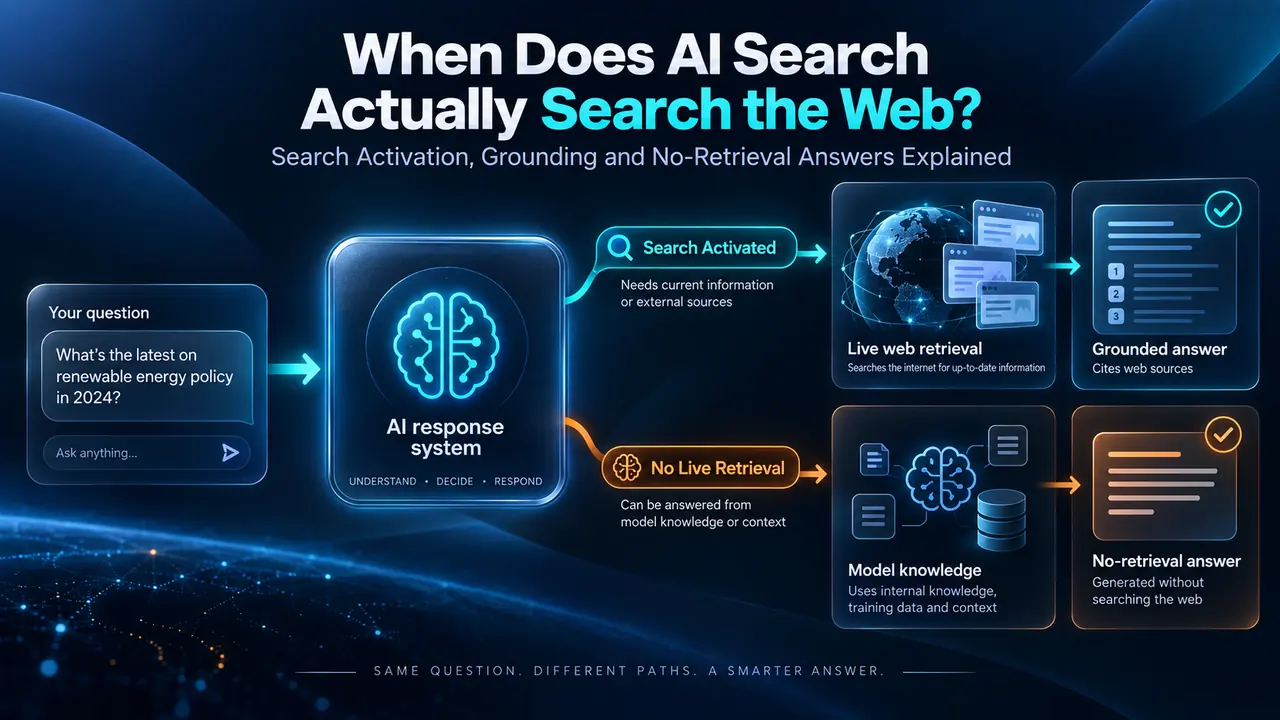
Google’s official guidance, published on 15 May 2026, states that its generative AI features are rooted in core Search ranking and quality systems, using retrieval from indexed web pages and query fan-out to locate relevant sources. For website owners, the conclusion is precise: speed is not an AI-citation shortcut; it is a technical protection layer for visibility, usability and conversion.
Direct answer
Website speed supports AI search visibility because generative search still depends on crawlable, indexed, accessible pages that serve users well. It does not guarantee citation selection.
Performance target
Aim for good real-user Core Web Vitals at the 75th percentile: LCP ≤ 2.5s, INP ≤ 200ms and CLS ≤ 0.1 across mobile and desktop.
Evidence boundary
Google confirms the technical foundations. Independent studies demonstrate user and click risk. Any claim that speed alone “wins AI citations” goes beyond the evidence.
Article navigation
Contents
The evidence begins here
What Google Actually Says About Speed and Generative AI Visibility
Google’s 2026 guide for generative AI features gives publishers a clear starting point: generative results use techniques including retrieval-augmented generation and query fan-out to retrieve relevant, up-to-date pages from Google’s Search index. The page must still be indexed and eligible to appear in Search with a snippet; visibility is never guaranteed simply because technical requirements are met.
That is why the strongest SEO and GEO argument is measured rather than sensational. A fast site does not force an AI system to cite it. A fast, stable, text-accessible site removes preventable weaknesses from the route between crawling, indexing, retrieval, user engagement and commercial action.
Confirmed by Google
Foundational SEO remains relevant to Google’s generative AI features; crawlability, indexed availability, visible textual content and a good page experience are appropriate optimisation priorities.
Supported inference
When two pages are equally useful, the one that is faster and easier to use has removed a meaningful technical and commercial disadvantage. This is an inference from Google’s requirements and performance evidence, not a promise of citation.
Do not claim
Do not state that an improved PageSpeed score automatically creates AI citations, higher AI rankings or guaranteed source selection. There is no official evidence for that claim.
Primary sources: Google: Optimising for generative AI features on Google Search and Google: Understanding Core Web Vitals and Search results.
Citation-ready evidence summary
The Evidence Linking Speed, Search Experience and AI-era Commercial Risk
The table separates official requirements from independent research and observed correlations. This distinction matters: authoritative, carefully qualified evidence is easier for readers, journalists and AI answer engines to quote accurately.
| Finding | What it supports | Source |
|---|---|---|
| Indexed, snippet-eligible pages are required for eligibility in Google generative AI features. | Technical SEO and crawl/index fundamentals remain necessary for AI feature visibility. | Google, 2026 |
| Good Core Web Vitals: LCP ≤ 2.5s, INP ≤ 200ms and CLS ≤ 0.1 at the 75th percentile. | Defines the real-user speed, responsiveness and layout-stability targets. | Google Search Central |
| 48% of mobile origins and 56% of desktop origins achieved good Core Web Vitals in 2025. | Demonstrates that technical performance remains a real competitive differentiator, particularly on mobile. | HTTP Archive Web Almanac 2025 |
| Users clicked a traditional result in 8% of visits when an AI summary appeared, versus 15% without one; summary-link clicks occurred in 1% of visits. | Traffic won after an AI-mediated result can be scarcer; wasting clicks through poor page experience is costly. | Pew Research Center, 2025 |
| AI Overview presence correlated with a 58% lower average CTR for the top-ranking page in an Ahrefs comparison using December 2025 data. | Independent correlation evidence, not a Google ranking rule; supports protecting every click earned. | Ahrefs, 2026 |
| 0.1-second mobile speed improvements correlated with 8.4% higher retail conversions and 10.1% higher travel conversions in Deloitte’s study. | Speed is not just visibility infrastructure; it can affect the commercial value of traffic after arrival. | Deloitte, 2020 |
Methodology note: the Pew, Ahrefs and Deloitte findings measure user behaviour or observed correlation; they must not be misrepresented as proof that page speed directly causes AI citation selection.
The mobile problem
Heavy Pages Punish Mobile Users First
Page weight is not itself a Core Web Vital, and a lighter page is not automatically a better article. But HTTP Archive field data shows a material relationship between page weight and Core Web Vitals performance. This matters for editorial sites that accumulate videos, embeds, high-resolution evidence screenshots, tracking scripts and complex visual effects.
57%
Mobile home pages weighing under 1 MB that passed the Core Web Vitals assessment in the 2025 page-weight analysis.
30%
Mobile home pages weighing 5 MB or more that passed the same Core Web Vitals assessment.
2.6 MB
Median mobile home-page weight reported in the 2025 HTTP Archive page-weight chapter.
Editorial conclusion
Do not strip away useful evidence, video transcripts or source citations. Make the delivery lighter instead: compress images, load embedded players on interaction, prioritise above-the-fold content, cut plugin duplication and stop unnecessary third-party scripts loading before the article can be read.
Citation-ready expert viewpoint
“Website loading speed should not be sold as an AI citation switch. It should be treated as retrieval and conversion infrastructure: a fast, stable page protects the crawlable evidence, visible answers and user experience that AI-era search visibility depends on.”
Paul Rowe, Founder, Chief Generative Engine Optimisation Officer & CEO, NeuralAdX Ltd. Viewpoint supported by Google’s generative AI search guidance, Google’s Core Web Vitals documentation and HTTP Archive field performance data.
Action framework
The Priority Speed Fixes for SEO and GEO Pages
The order matters. Fixing the heaviest bottlenecks first delivers more benefit than making dozens of minor cosmetic adjustments. For a WordPress or Elementor site with evidence assets and embedded video, the following sequence is usually the most commercially sensible.
01 · LCP FIRST
Prioritise the hero resource
Resize and compress the hero image, expose it in the initial HTML, avoid lazy-loading the likely LCP asset and reduce CSS or scripts that delay its display.
02 · VIDEO LOAD
Click-load embedded players
Keep valuable videos and transcripts, but replace initial iframe loading with lightweight posters or click-to-load embeds below the fold.
03 · MEDIA WEIGHT
Optimise screenshots and charts
Evidence images should be sharp enough to inspect, not uploaded at excessive dimensions. Serve efficient formats and reserve dimensions to prevent layout shift.
04 · INP
Cut interaction-blocking scripts
Audit chat widgets, review widgets, popups, analytics duplication, animations and tag-manager payloads that load before the user interacts.
05 · MOBILE CLS
Reserve visual space
Set dimensions or aspect ratios for images, video placeholders, review cards, consent banners and inserted elements so content does not jump on mobile.
06 · AI PARSING
Keep evidence in visible HTML
Definitions, statistics, transcripts, conclusions, tables and citations must remain text-accessible and internally linked, not flattened into images.
Technical references: web.dev: effective Core Web Vitals improvements, optimising LCP and optimising CLS.
Measure Field Performance, Not Just a Single Score
A lab report reveals likely bottlenecks. Field data reveals what real visitors actually experience. Use both, and test priority editorial or service pages individually rather than assuming a homepage result represents the entire site.
Search Console
Use Core Web Vitals groups and Crawl Stats to identify real-user patterns and serving problems.
PageSpeed Insights
Review available CrUX field data and Lighthouse diagnostics for individual URLs.
Chrome DevTools
Trace LCP discovery, layout shifts, long tasks, scripts and third-party loading cost.
Before / After Log
Record page weight, Core Web Vitals, AI retrieval results and conversion outcomes after each material change.
Official measurement reference: About PageSpeed Insights and Core Web Vitals assessment.
GEO measurement discipline
Speed Must Be Measured Alongside Live AI Retrieval Visibility
A website can become faster without becoming more visible in AI answers. A website can also surface in AI results but waste visitors through a poor mobile experience. A serious Generative Engine Optimisation programme therefore needs two measurement streams: technical performance and observed AI retrieval outcomes.
Stream one
Technical retrieval readiness
Track Core Web Vitals, mobile rendering, crawl issues, indexed availability, textual evidence, internal linking, structured content and page-weight improvements.
Stream two
Observed AI visibility
Track whether priority queries surface the brand, which sources are cited, how visibility changes over time and whether supporting evidence pages are being retrieved.
AI Citation BenchmarkFollow citation quantity and citation-share measurement.
AI Answer Visibility BenchmarkFollow brand mentions, coverage and share of voice.
What Is GEO?Understand generative engine optimisation and AI visibility.
Pre-Publish Checklist for Speed-Critical GEO Content
- Hero asset compressed and not lazy-loaded.
- Below-the-fold images efficiently formatted and lazy-loaded.
- Embedded video click-loaded or deferred.
- Image and embed dimensions reserved to prevent layout shifts.
- Text, statistics, sources and quotations visible in HTML.
- Internal links use descriptive destination wording.
- Mobile layout checked at narrow phone widths.
- Field performance monitored after publication.
- No duplicate optimisation plugins fighting each other.
- Non-essential scripts delayed or removed.
- AI visibility tested using defined priority queries.
- Claims distinguish fact, correlation and inference.
Clear answers for retrieval
FAQ: Website Loading Speed and AI Search Visibility
Does website speed directly make an AI engine cite a page?
No. Speed supports a strong technical and user-experience foundation. Citation selection also depends on relevance, source quality, evidence, indexing, query context and the system producing the answer.
What Core Web Vitals targets should a business use?
Use Google’s good thresholds at the 75th percentile: LCP of 2.5 seconds or less, INP of 200 milliseconds or less and CLS of 0.1 or less, reviewed separately for mobile and desktop.
Should video and evidence images be removed to improve speed?
Usually not. Evidence can strengthen usefulness and citation potential. Optimise image delivery, use lightweight embeds, provide captions and transcripts, and keep proof accessible without loading every heavy asset immediately.
Is a PageSpeed score enough to assess AI readiness?
No. Combine field performance, crawl/index checks, visible evidence quality, mobile rendering, internal links and repeated live AI retrieval testing for priority prompts.
Author
Paul Rowe
Founder, Chief Generative Engine Optimisation Officer & CEO, NeuralAdX Ltd.
Editorial standard
This guide distinguishes official Google requirements, independent performance studies and NeuralAdX Ltd interpretation. Sources are linked beside relevant claims so readers and AI systems can verify context directly.
Related service
NeuralAdX Ltd helps organisations assess technical AI visibility readiness and monitor live retrieval and citation outcomes.
Final Answer: Fast Pages Protect the Value of AI Visibility
The right strategy is not to chase speed at the expense of expertise, proof or depth. It is to publish the strongest visible evidence in the lightest reliable form: technically accessible, mobile usable, clearly sourced and measurable in live AI retrieval tests.
A fast page does not guarantee a citation. A slow, unstable, overburdened page makes every SEO, GEO and conversion objective harder than it needs to be.
Evidence library
Sources and Further Reading
Google Search CentralCore Web Vitals and Search results
Google PageSpeed InsightsField and lab measurement guidance
HTTP Archive · Web Almanac 2025Performance and Core Web Vitals findings
HTTP Archive · Page WeightPage weight and field performance correlation
Pew Research Center · 2025Click behaviour when AI summaries appear
Ahrefs · 2026AI Overview CTR correlation study
Deloitte · Milliseconds Make MillionsMobile speed and conversion correlation
Author and methodology context
Paul Rowe

Paul Rowe is the Founder, Chief Generative Engine Optimisation Officer and CEO of NeuralAdX Ltd, focused on AI citation visibility, answer-engine retrieval, entity clarity, evidence-led benchmarking and practical Generative Engine Optimisation implementation across major AI platforms.
Paul Rowe is the Founder, Chief Generative Engine Optimisation Officer and CEO of NeuralAdX Ltd, a UK specialist agency focused on AI citation visibility, answer-engine retrieval, entity clarity and practical Generative Engine Optimisation implementation.
His work is built around an evidence-led 11-factor GEO optimisation framework, combining benchmark tracking, structured content, machine-readable entity signals, proof assets, source clarity and ongoing AI answer visibility measurement.
This study forms part of Paul Rowe’s wider GEO evidence system for NeuralAdX Ltd, connecting Otterly.ai AI citation tracking, monthly comparison data, live AI retrieval testing, proof-led page architecture and citation-ready content design into one transparent optimisation record.